Documentation Plugin Reference
Everything you need to install, configure, and use Rikugan, the AI reverse-engineering plugin for IDA Pro and Binary Ninja.
Requirements
- IDA Pro 9.0+ with Hex-Rays decompiler (recommended), or Binary Ninja (UI mode)
- Python 3.10+
- At least one LLM provider API key (or Ollama for local inference)
- Windows, macOS, or Linux
Installation
One-line install
Auto-detects IDA Pro, Binary Ninja, or both. Clones the repo to ~/.rikugan and runs the appropriate installer.
curl -fsSL https://raw.githubusercontent.com/buzzer-re/Rikugan/main/install.sh | bashInstall for a specific host only:
# IDA Pro only
curl -fsSL https://raw.githubusercontent.com/buzzer-re/Rikugan/main/install.sh | bash -s -- --ida

# Binary Ninja only
curl -fsSL https://raw.githubusercontent.com/buzzer-re/Rikugan/main/install.sh | bash -s -- --binja
irm https://raw.githubusercontent.com/buzzer-re/Rikugan/main/install.ps1 | iexInstall for a specific host only:
# IDA Pro only
& ([scriptblock]::Create((irm https://raw.githubusercontent.com/buzzer-re/Rikugan/main/install.ps1))) -Target ida

# Binary Ninja only
& ([scriptblock]::Create((irm https://raw.githubusercontent.com/buzzer-re/Rikugan/main/install.ps1))) -Target binja
Manual install
Alternatively, clone the repository and run the per-host installer directly.
git clone https://github.com/buzzer-re/rikugan.git
cd rikugan
Run the installer
./install_ida.shOptional: pass a custom user dir path
./install_ida.sh /path/to/ida/user/dirinstall_ida.batOptional: pass a custom user dir path
install_ida.bat "C:\Users\you\AppData\Roaming\Hex-Rays\IDA Pro"./install_binaryninja.shOptional: pass a custom user dir path
./install_binaryninja.sh /path/to/binaryninja/user/dirinstall_binaryninja.batOptional: pass a custom user dir path
install_binaryninja.bat "C:\Users\you\AppData\Roaming\Binary Ninja"Installers auto-detect the user directory for their host. They create plugin links/junctions, install Python dependencies, and initialize the Rikugan config directory.
Set your API key
Open Rikugan in your disassembler, click Settings, and paste your API key for your preferred provider.
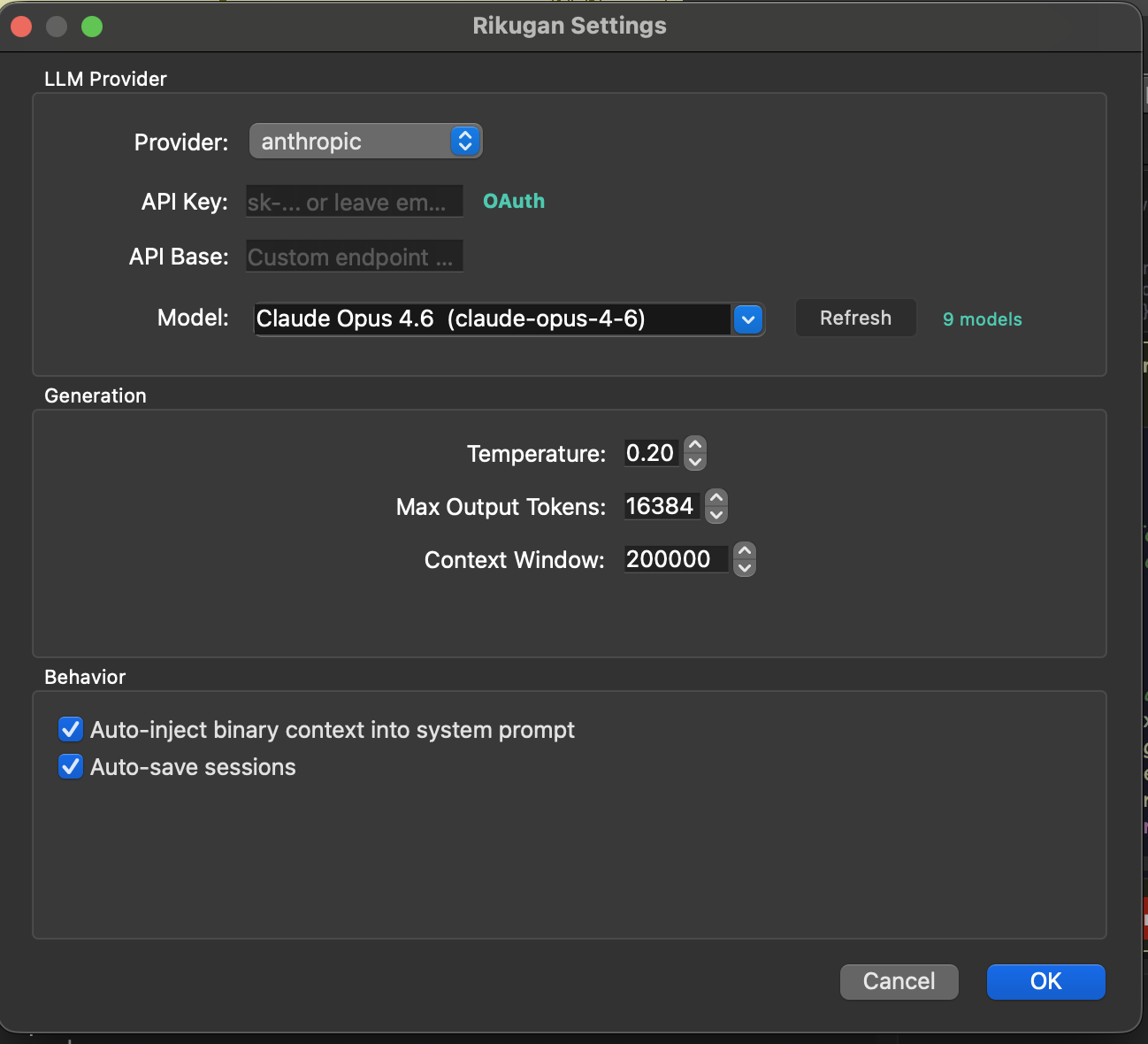
claude setup-token.Configuration
Rikugan stores its configuration per host:
| Host | Platform | Config Path |
|---|---|---|
| IDA Pro | Linux / macOS | ~/.idapro/rikugan/config.json |
| IDA Pro | Windows | %APPDATA%\Hex-Rays\IDA Pro\rikugan\config.json |
| Binary Ninja | Linux | ~/.binaryninja/rikugan/config.json |
| Binary Ninja | macOS | ~/Library/Application Support/Binary Ninja/rikugan/config.json |
| Binary Ninja | Windows | %APPDATA%\Binary Ninja\rikugan\config.json |
You can edit this JSON file directly, or use the Settings dialog in the UI.
Config Structure
{
  "provider": {
    "name": "anthropic",
    "model": "claude-sonnet-4-6",
    "api_key": "sk-...",
    "api_base": ""
  },
  "max_tokens": 16384,
  "temperature": 0.2,
  "context_window": 200000,
  "checkpoint_auto_save": true,
  "max_tool_result_chars": 8000
}| Key | Type | Description |
|---|---|---|
provider.name | string | Provider name: anthropic, openai, gemini, ollama, openai_compat |
provider.model | string | Model ID (e.g., claude-sonnet-4-20250514, gpt-4o) |
provider.api_key | string | API key for the provider |
provider.api_base | string | Custom API base URL (for openai_compat or Ollama) |
max_tokens | int | Max output tokens per response (default 16384) |
temperature | float | Sampling temperature (default 0.2) |
context_window | int | Max context window size in tokens (default 200000) |
checkpoint_auto_save | bool | Auto-save sessions after each turn (default true) |
max_tool_result_chars | int | Truncate tool results beyond this limit (default 8000) |
Opening the Panel
| Host | How to Open |
|---|---|
| IDA Pro | Press Ctrl+Shift+I, or Edit → Plugins → Rikugan |
| Binary Ninja | Tools → Rikugan → Open Panel, or use the sidebar icon |
Chat & Multi-Tab
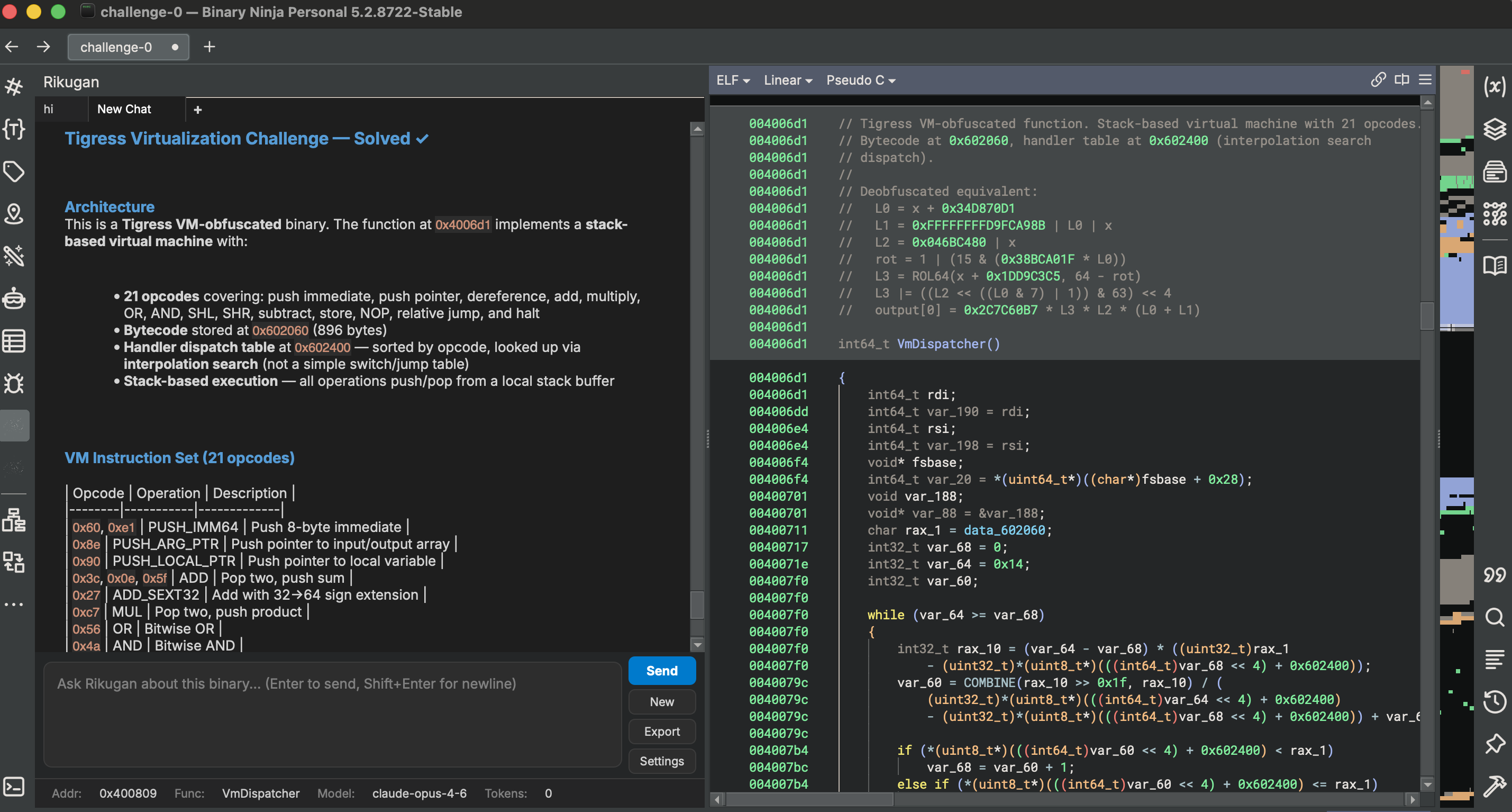
Each tab is an independent conversation with its own message history and context.
- New tab: Click the
+button - Close tab: Click the × on the tab
- Fork session: Right-click a tab → "Fork Session" to create a copy at the current point
- Persistence: Tabs are tied to the current file. Opening a different database starts fresh tabs; returning restores saved conversations.
Quick Actions
IDA Pro exposes these in right-click context menus. Binary Ninja has equivalent commands under Tools → Rikugan.
| Action | Description |
|---|---|
| Send to Rikugan | Pre-fills input with current selection (Ctrl+Shift+A in IDA) |
| Explain this | Auto-explains the current function |
| Rename with Rikugan | Analyzes usage patterns and renames with evidence |
| Deobfuscate | Systematic deobfuscation of the current function |
| Find vulnerabilities | Security audit of the current function |
| Suggest types | Infers types from usage patterns |
| Annotate function | Adds inline comments to decompiled code |
| Clean microcode / IL | Identifies and NOPs junk instructions |
| Xref analysis | Deep cross-reference tracing |
Skills
Skills are reusable analysis workflows. Type / in the input area to see available skills with autocomplete.
| Skill | Description |
|---|---|
/malware-analysis | Windows PE malware — kill chain, IOC extraction, MITRE ATT&CK mapping |
/linux-malware | ELF malware — packing, persistence, IOC extraction |
/deobfuscation | String decryption, CFF removal, opaque predicates, MBA simplification |
/vuln-audit | Buffer overflows, format strings, integer issues, memory safety |
/driver-analysis | Windows kernel drivers — DriverEntry, dispatch table, IOCTL handlers |
/ctf | Capture-the-flag challenges — find the flag efficiently |
/generic-re | General-purpose binary understanding |
/ida-scripting | IDAPython API reference for writing scripts |
/binja-scripting | Binary Ninja Python API reference for writing scripts |
Commands
| Command | Description |
|---|---|
/plan <msg> | Generate a multi-step plan, get approval, then execute step-by-step |
/explore <msg> | Autonomous binary analysis — spawns subagents for deep parallel exploration |
/modify <msg> | Natural language binary patching — exploration + plan + patch + save |
/memory | Show current RIKUGAN.md persistent memory contents |
/undo [N] | Undo the last N mutations (default 1) |
/mcp | Show MCP server health status |
/doctor | Diagnose provider, API key, tools, skills, and config issues |
Exploration Mode
Exploration mode is directly inspired by how code agents work, but applied to binaries instead of source code. Instead of analyzing everything in a single context, the orchestrator delegates focused tasks to isolated subagents.
How to use
/explore Analyze this binary and tell me what it doesHow it works
- ORIENT — The orchestrator reads imports, exports, strings, and key functions to build a map of what the binary is doing.
- DELEGATE — Instead of doing everything in a single context, it spawns subagents and delegates focused tasks to each one: “analyze this function”, “trace this data structure”, “figure out what this import cluster is doing”.
- ANALYZE — Subagents run in complete isolation from the parent session. They are independent instances of Rikugan with a single task and zero prior knowledge.
- SYNTHESIZE — Each subagent reports its findings back to the orchestrator, which synthesizes everything and continues toward your goal.
This gives you deeper and faster analysis than a single agent pass, and keeps the main context window clean. During exploration, the agent also renames functions when it has high confidence about what a function actually does.
Natural Language Patching (Experimental)
A binary is code, code is text, and LLMs are good at reading and writing text. /modify does what agentic coding does for source — on the compiled binary.
/modify make this maze game easy to me, make me pass through the wallsRikugan runs exploration mode, builds context about the binary, and applies the patches. The workflow goes through EXPLORE → PLAN → PATCH → SAVE stages. This can produce issues (segfaults, crashes), but you can feed those back and it will try to fix them.
Research Mode
The /research command performs goal-driven deep analysis of a binary and produces structured documentation. Unlike exploration mode (which gathers context for the agent to act on), research mode outputs Obsidian/Logseq-compatible Markdown files into a notes/ directory — building a persistent knowledge base you can browse, link, and search outside of Rikugan.
How it works
- Type
/research <your goal>in the chat — e.g. “/research document the C2 protocol and command dispatch” - The agent explores the binary towards that specific goal, using decompilation, cross-references, strings, and type information
- Findings are written as interlinked Markdown notes into
notes/, with front-matter, backlinks, and tags compatible with Obsidian and Logseq
Enable Preserve full context in settings to disable tool result truncation during research sessions — ideal when losing decompilation context is worse than higher token cost.
Plan Mode
Plan mode is a simpler two-step workflow: plan first, then execute.
/plan Rename all functions in the crypto module with meaningful names- The agent generates a numbered plan
- You approve or reject the plan
- The agent executes each step with progress tracking
Bulk Renamer
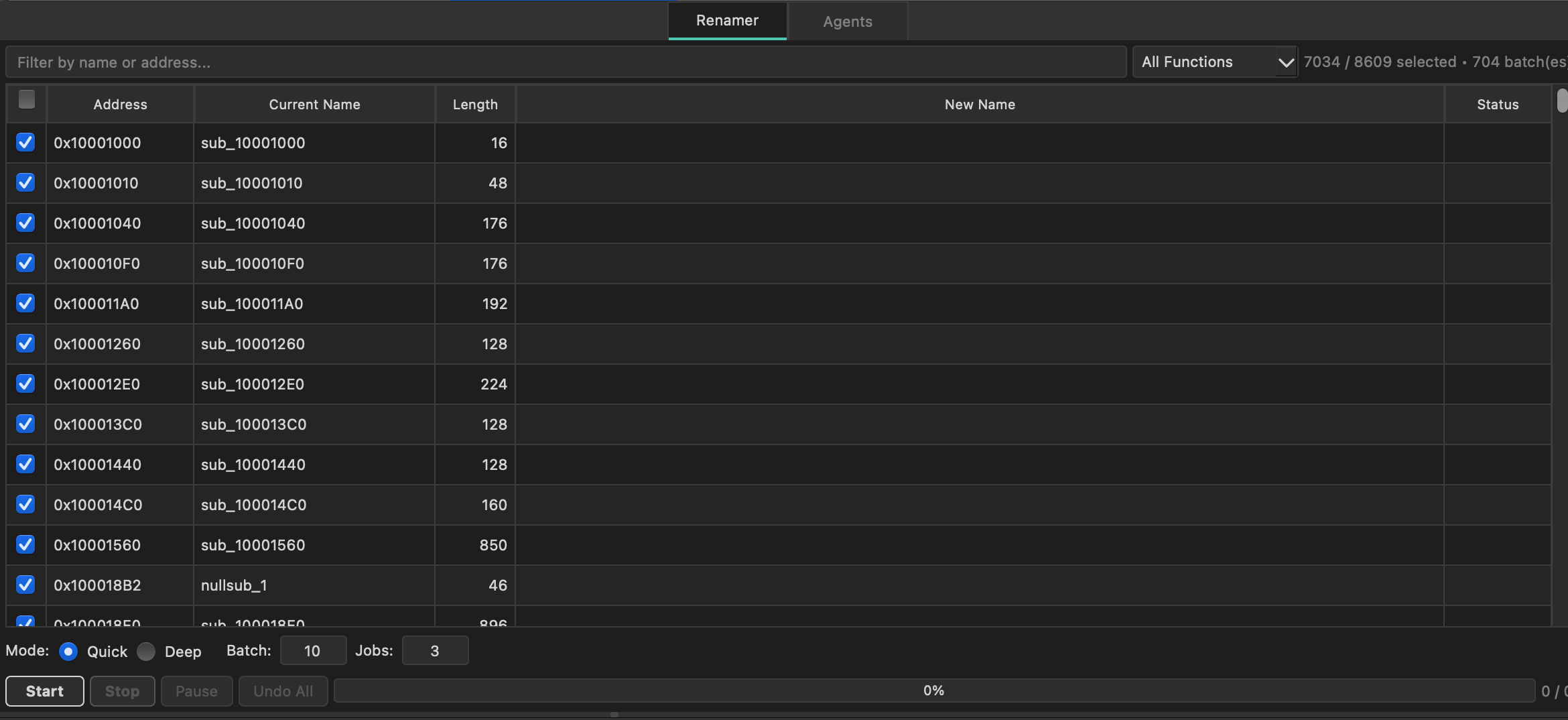
The bulk renamer agent batch-renames symbols across the binary using subagent orchestration. Instead of renaming functions one by one, the agent analyzes groups of related functions and renames them in coordinated batches.
Configuration
- Batch size — number of symbols analyzed per subagent batch (default: 10)
- Max concurrent — parallel subagent limit (default: 3)
Both values are configurable in Settings > Behavior. The tools panel is embedded as a Chat | Tools tab in the sidebar for easier access during rename sessions.
Mutation & Undo
Every mutating tool call (renames, comments, type changes, prototypes) is automatically recorded with a reverse operation. The Mutation Log panel shows the history.
/undo        # undo last mutation
/undo 5      # undo last 5 mutations
Supported reverse operations: rename_function, rename_variable, set_comment, set_function_comment, rename_data, set_function_prototype, retype_variable. execute_python calls are marked as non-reversible.
Script Approval
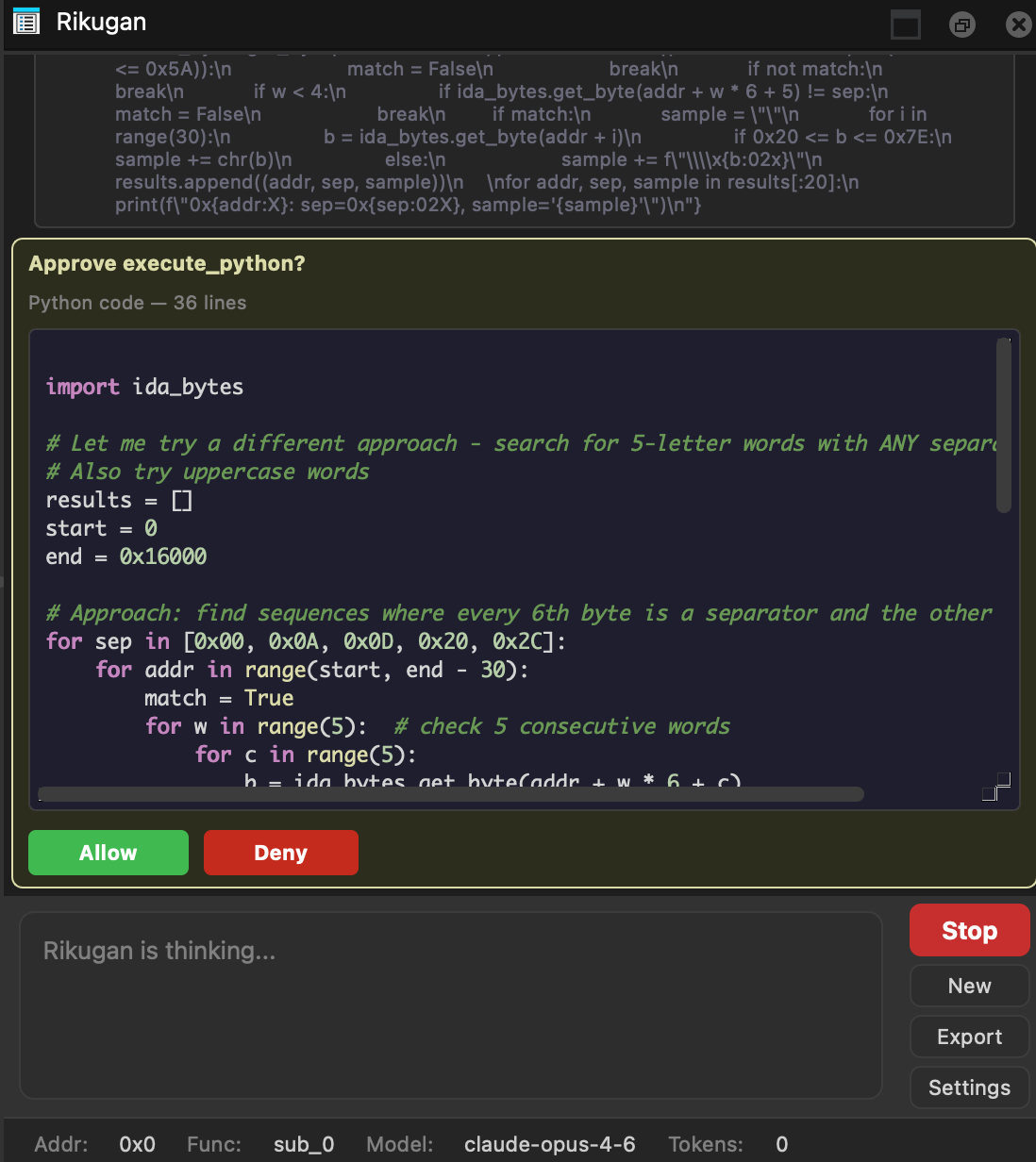
The execute_python tool always asks permission before running. You see the full Python code with syntax highlighting in a scrollable preview, and can Allow or Deny each execution.
MCP Servers
Connect external MCP servers to extend Rikugan with additional tools. Create the config file:
| Host | Platform | MCP Config Path |
|---|---|---|
| IDA Pro | Linux / macOS | ~/.idapro/rikugan/mcp.json |
| IDA Pro | Windows | %APPDATA%\Hex-Rays\IDA Pro\rikugan\mcp.json |
| Binary Ninja | Linux | ~/.binaryninja/rikugan/mcp.json |
| Binary Ninja | macOS | ~/Library/Application Support/Binary Ninja/rikugan/mcp.json |
| Binary Ninja | Windows | %APPDATA%\Binary Ninja\rikugan\mcp.json |
{
  "mcpServers": {
    "my-server": {
      "command": "python",
      "args": ["-m", "my_mcp_server"],
      "env": {},
      "enabled": true
    }
  }
}
MCP servers are started in background threads when the plugin loads. Their tools appear with the prefix mcp_<server>_<tool>. Set "enabled": false to keep a server configured without starting it.
The MCP client uses JSON-RPC 2.0 with Content-Length framing and sends periodic heartbeat pings every 30 seconds to detect unresponsive servers. A server is marked unhealthy if a heartbeat times out; it recovers automatically when pings succeed again.
Use /mcp in the chat to check the health status of all connected servers.
Custom Skills
Create custom skills in your user directory:
# IDA Pro
~/.idapro/rikugan/skills/                                        # Linux / macOS
%APPDATA%\Hex-Rays\IDA Pro\rikugan\skills\                       # Windows

# Binary Ninja
~/.binaryninja/rikugan/skills/                                   # Linux
~/Library/Application Support/Binary Ninja/rikugan/skills/       # macOS
%APPDATA%\Binary Ninja\rikugan\skills\                           # Windows

my-skill/
  SKILL.md             # required: frontmatter + prompt body
  references/          # optional: .md files auto-appended
    api-notes.md
Skill Format
---
name: My Custom Skill
description: What it does in one line
tags: [analysis, custom]
allowed_tools: [decompile_function, rename_function]
---
Task: <instruction for the agent>

## Approach
1. First step...
2. Second step...| Field | Type | Description |
|---|---|---|
name | string | Display name |
description | string | One-line description |
tags | list | Categorization tags |
allowed_tools | list | Tool whitelist (empty = all tools) |
External Skills & MCP
Rikugan can import skills and MCP servers from Claude Code and OpenAI Codex. This lets you reuse workflows and tool integrations you already have configured in those agents.
Shared Skills
Rikugan discovers skills from:
| Source | Skills Directory |
|---|---|
| Claude Code | ~/.claude/skills/ |
| Codex | ~/.codex/skills/ (or $CODEX_HOME/skills/) |
Both use the same SKILL.md format as Rikugan's own custom skills. Discovered skills appear in Settings → Skills tab, grouped by source. External skills are opt-in — check the ones you want to enable.
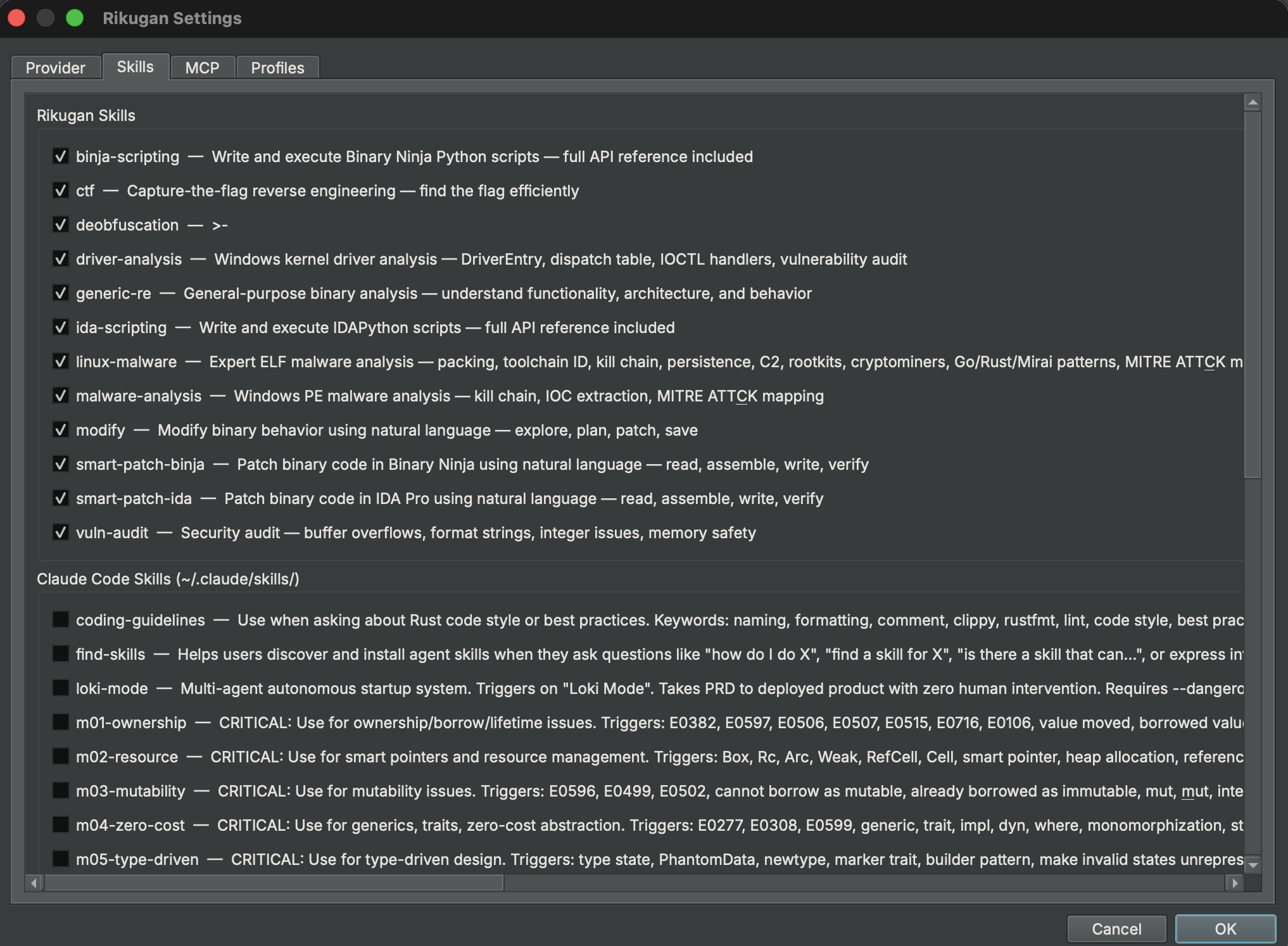
Shared MCP Servers
Rikugan discovers MCP server configurations from:
| Source | Config Locations (checked in order) |
|---|---|
| Claude Code | ~/.claude/.mcp.json → ~/.claude/mcp.json → ~/.claude.json → platform-managed config |
| Codex | ~/.codex/config.toml (or $CODEX_HOME/config.toml) |
Discovered servers appear in Settings → MCP tab, grouped by source. Like skills, external MCP servers are opt-in — check the ones you want to enable. Once enabled, their tools appear alongside built-in ones with the mcp_<server>_<tool> prefix.
Profiles
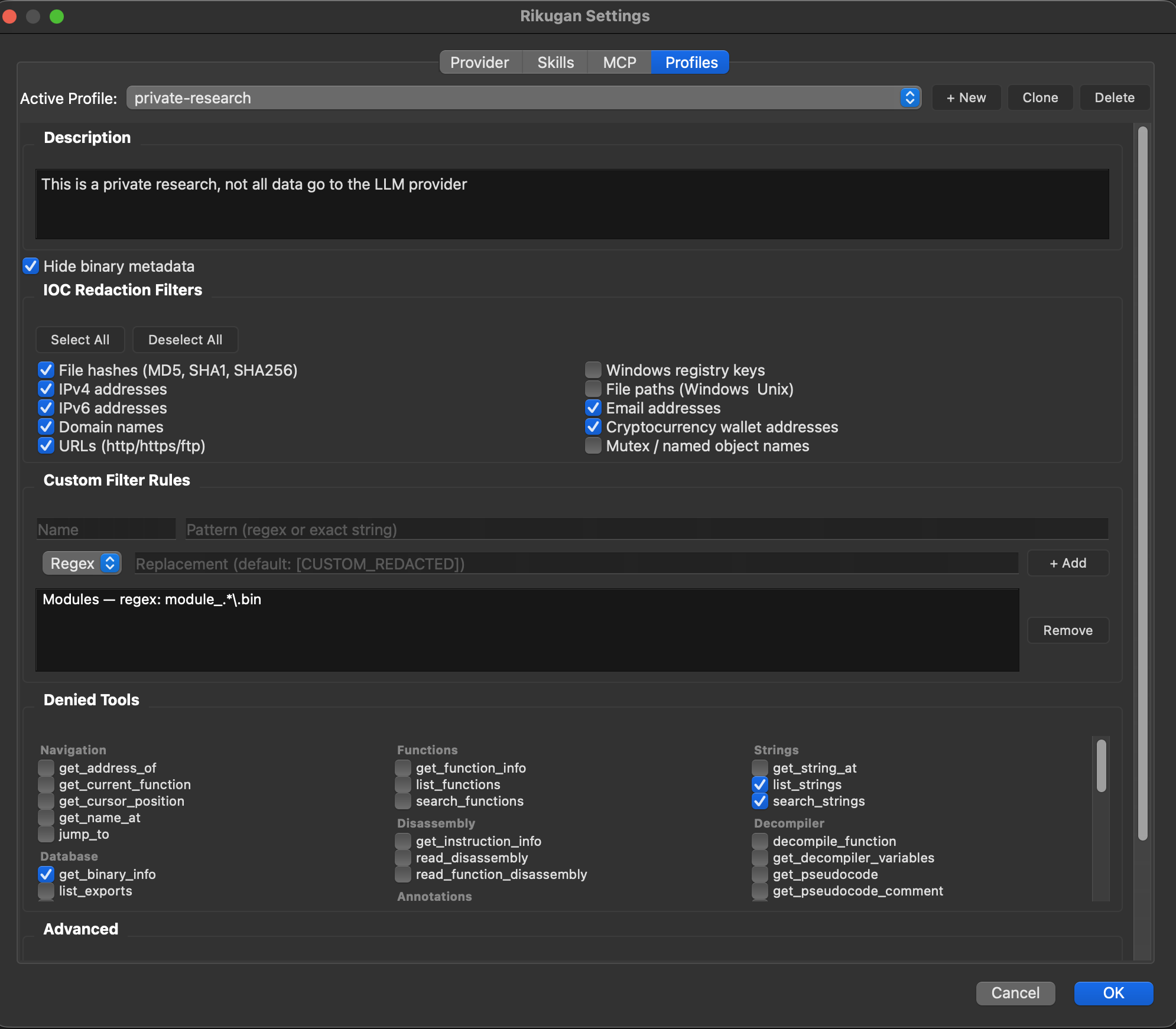
Profiles give you granular control over what the agent can see and do. They are especially useful for private or sensitive analysis where you need to prevent data from leaking to the LLM provider.
Built-in Profiles
| Profile | Description |
|---|---|
| default | No restrictions. All tools and data available. |
| private | Full lockdown — hides all binary metadata, enables all IOC filters, restricts to single-binary analysis. |
What Profiles Control
| Setting | What It Does |
|---|---|
| Denied Tools | Tools the agent cannot call. Removed from the LLM schema and blocked at execution time (defense-in-depth). |
| IOC Filters | Automatically redact indicators of compromise from all tool results before the LLM sees them. 10 categories: hashes, IPv4, IPv6, domains, URLs, registry keys, file paths, emails, crypto wallets, mutexes. |
| Custom Filter Rules | User-defined redaction patterns (regex or exact match) with custom replacement text. Applied after IOC filters. |
| Hide Binary Metadata | Excludes binary info, strings, function names, and cursor position from the system prompt entirely. |
| Singular Analysis | Tells the agent to only analyze the current binary — no cross-references to external threat intel or other files. |
| Denied Functions | Specific functions in the binary the agent should not analyze or reference. |
| Prompt Filters | Custom instructions injected into the system prompt to guide agent behavior. |
IOC Hexdump Defense
When IOC filters are active, Rikugan also preprocesses hexdump output — raw bytes are decoded, IOC byte positions are identified, and those bytes are zeroed out. This prevents the LLM from reconstructing filtered indicators by reading hex values directly (e.g., decoding 31 39 32 2e 31 36 38 back to 192.168).
Creating Custom Profiles
Open Settings → Profiles and click + New or Clone an existing profile. All settings are edited through the UI. Profiles are saved in your Rikugan config file alongside provider settings.
Persistent Memory
Rikugan automatically creates a RIKUGAN.md file in the same directory as your IDB/BNDB. This file persists across sessions:
- The first 200 lines are loaded into the system prompt on every session
- The agent can save facts via the
save_memorypseudo-tool - Approved plans from exploration mode are also saved here
- Use
/memoryto view current contents
Chat Export
Right-click a tab or click the Export button to save a conversation as Markdown. Tool calls are formatted with language-appropriate syntax highlighting (c for decompiled code, x86asm for disassembly, python for scripts).
API Key Encryption
All stored API keys can optionally be encrypted at rest using AES-256-GCM with PBKDF2-HMAC-SHA256 key derivation (600,000 iterations). When enabled, plaintext keys are zeroed out in config.json and replaced with a single encrypted blob.
How it works
- Open Settings > Behavior and check “Encrypt API keys with password”
- Enter and confirm a password — this password is never saved to disk
- On every Rikugan session start, you will be prompted for the password to decrypt your keys (3 attempts)
The feature degrades gracefully if the cryptography Python package is not available — the checkbox will be grayed out with a tooltip explaining the missing dependency.
Tools Reference
50 tools are shared across both hosts with identical interfaces. IDA adds 6 host-specific microcode tools; Binary Ninja adds 13 host-specific IL tools for reading, analyzing, and transforming its intermediate language.
Shared Tools (50)
| Category | Tools |
|---|---|
| Navigation | get_cursor_position get_current_function jump_to get_name_at get_address_of |
| Functions | list_functions get_function_info search_functions |
| Strings | list_strings search_strings get_string_at |
| Database | list_segments list_imports list_exports get_binary_info read_bytes |
| Disassembly | read_disassembly read_function_disassembly get_instruction_info |
| Decompiler | decompile_function get_pseudocode get_decompiler_variables |
| Xrefs | xrefs_to xrefs_from function_xrefs |
| Annotations | rename_function rename_variable set_comment set_function_comment rename_address set_type |
| Types | create_struct modify_struct get_struct_info list_structs create_enum modify_enum get_enum_info list_enums create_typedef apply_struct_to_address apply_type_to_variable set_function_prototype import_c_header suggest_struct_from_accesses propagate_type get_type_libraries import_type_from_library |
| Scripting | execute_python — requires user approval |
IDA-Only Tools (6)
| Category | Tools |
|---|---|
| Microcode | get_microcode get_microcode_block nop_microcode install_microcode_optimizer remove_microcode_optimizer list_microcode_optimizers |
Binary Ninja-Only Tools (13)
| Category | Tools |
|---|---|
| IL Core | get_il get_il_block nop_instructions redecompile_function |
| IL Analysis | get_cfg track_variable_ssa |
| IL Transform | il_replace_expr il_set_condition il_nop_expr il_remove_block patch_branch write_bytes install_il_workflow |
Providers
| Provider | provider.name | Notes |
|---|---|---|
| Anthropic (Claude) | anthropic | OAuth auto-detection on macOS, prompt caching, retry with backoff |
| OpenAI | openai | Standard SDK, all models including GPT-4o and o-series |
| Google Gemini | gemini | google-genai SDK |
| Ollama | ollama | Local inference, set api_base to your Ollama URL (default: http://localhost:11434) |
| OpenAI-Compatible | openai_compat | Any endpoint with OpenAI-compatible API. Set api_base to your URL. |
Config Reference
Config Paths
All paths below are under each host's user directory. IDA Pro shares the same user directory on Linux and macOS (~/.idapro/); Binary Ninja uses a platform-specific location.
| File | IDA Pro — Linux / macOS | IDA Pro — Windows |
|---|---|---|
| Main config | ~/.idapro/rikugan/config.json | %APPDATA%\Hex-Rays\IDA Pro\rikugan\config.json |
| MCP config | ~/.idapro/rikugan/mcp.json | %APPDATA%\Hex-Rays\IDA Pro\rikugan\mcp.json |
| Custom skills | ~/.idapro/rikugan/skills/ | %APPDATA%\Hex-Rays\IDA Pro\rikugan\skills\ |
| Sessions | ~/.idapro/rikugan/sessions/ | %APPDATA%\Hex-Rays\IDA Pro\rikugan\sessions\ |
| Debug log | ~/.idapro/rikugan/rikugan_debug.log | %APPDATA%\Hex-Rays\IDA Pro\rikugan\rikugan_debug.log |
| Structured log | ~/.idapro/rikugan/rikugan_structured.jsonl | %APPDATA%\Hex-Rays\IDA Pro\rikugan\rikugan_structured.jsonl |
| Persistent memory | <idb_directory>/RIKUGAN.md | |
| File | Binary Ninja — Linux | Binary Ninja — macOS | Binary Ninja — Windows |
|---|---|---|---|
| Main config | ~/.binaryninja/rikugan/config.json | ~/Library/Application Support/Binary Ninja/rikugan/config.json | %APPDATA%\Binary Ninja\rikugan\config.json |
| MCP config | ~/.binaryninja/rikugan/mcp.json | ~/Library/Application Support/Binary Ninja/rikugan/mcp.json | %APPDATA%\Binary Ninja\rikugan\mcp.json |
| Custom skills | ~/.binaryninja/rikugan/skills/ | ~/Library/Application Support/Binary Ninja/rikugan/skills/ | %APPDATA%\Binary Ninja\rikugan\skills\ |
| Sessions | ~/.binaryninja/rikugan/sessions/ | ~/Library/Application Support/Binary Ninja/rikugan/sessions/ | %APPDATA%\Binary Ninja\rikugan\sessions\ |
| Debug log | ~/.binaryninja/rikugan/rikugan_debug.log | ~/Library/Application Support/Binary Ninja/rikugan/rikugan_debug.log | %APPDATA%\Binary Ninja\rikugan\rikugan_debug.log |
| Structured log | ~/.binaryninja/rikugan/rikugan_structured.jsonl | ~/Library/Application Support/Binary Ninja/rikugan/rikugan_structured.jsonl | %APPDATA%\Binary Ninja\rikugan\rikugan_structured.jsonl |
| Persistent memory | <bndb_directory>/RIKUGAN.md | ||